Hunting Down a Database Connection Leak in Azure Functions
TL;DR: A database connection leak brought down our test environment. After two days of systematic debugging through Durable Functions lifecycles, database hooks, and integration code, we discovered an uncommitted transaction silently consuming connections. Here's how we tracked it down.
The Incident
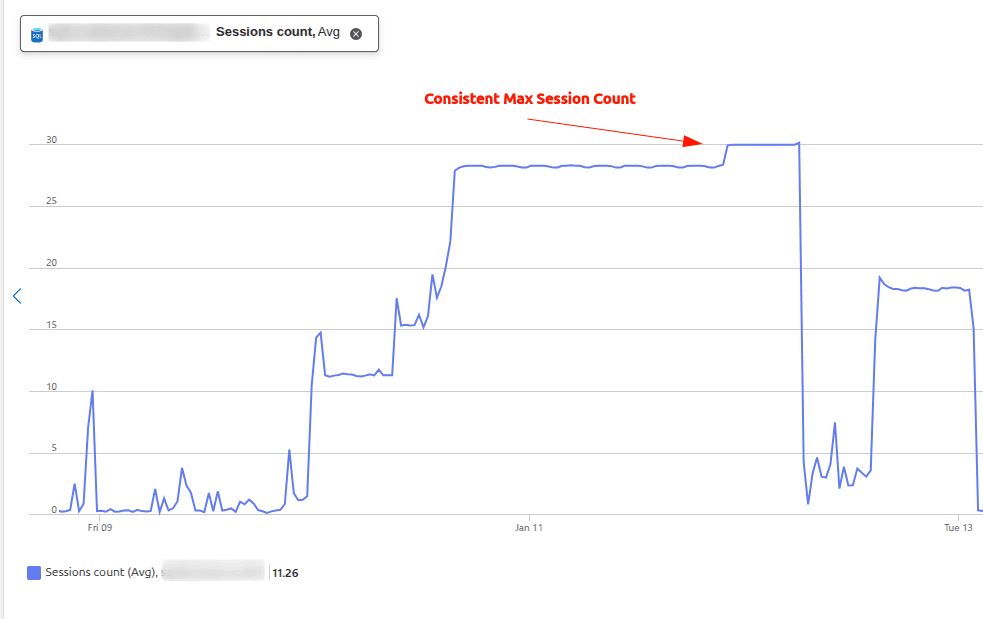
On January 11, 2025, our test environment came to a grinding halt. Our QA tester couldn't log in while testing the Cancellation Workflow, and the application was throwing timeout errors across the board.
A quick check of Azure Monitor revealed the culprit: all 30 database connections in our connection pool were maxed out. No connections available meant no database operations, and no database operations meant a completely unusable application.
As one of the co-contributors to our workflows and automation project, I was assigned to hunt down and fix this bug. I was both thrilled and nervous—connection leaks are notoriously tricky to debug and would require diving deep into our system architecture.
Initial Diagnosis: Understanding the Problem
Before jumping into the investigation, I needed to understand what we were dealing with.
What is a connection leak?
A connection leak occurs when an application opens a database connection but fails to properly close or release it. These orphaned connections accumulate over time until the connection pool is exhausted.
Our setup:
Our system uses connection pooling with a maximum of 30 connections. Instead of opening and closing connections for every database operation, we reuse existing connections from the pool—a common performance optimization strategy.
The challenge? With a serverless architecture using Azure Functions, managing connection lifecycles becomes more complex. Our app relies on:
- Azure Functions for standard operations
- Durable Functions for long-running background workflows
Understanding the Landscape: Our Architecture
To effectively debug this issue, I needed to map out where connections might be leaking.
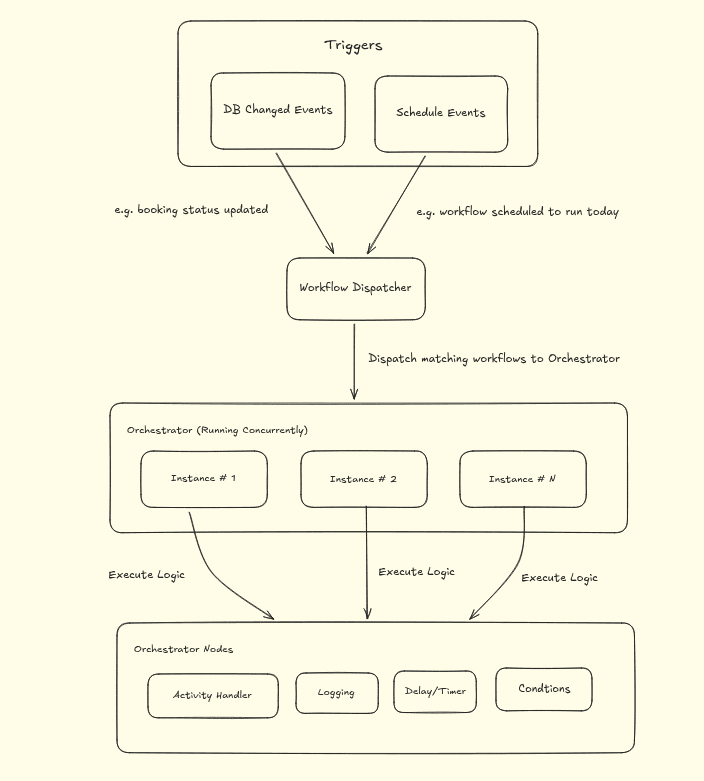
Our workflows and automation system follows this general architecture:
- Multiple orchestrator nodes that can each communicate with the database
- Durable Functions handling complex, multi-step workflows
- Various triggers and hooks responding to database events
Each of these components represented a potential source of the leak.
The Investigation Journey
Hypothesis 1: Durable Functions Lifecycle Issues
Given that the problem occurred during workflow testing, Durable Functions seemed like the obvious suspect. My initial theories:
Theory A: When Durable Functions freeze after completing their logic, perhaps internal timers for releasing connections also stop, leaving connections hanging.
Theory B: When Durable Functions scale out and create different workers to divide tasks, maybe each worker instance creates its own connection pool. With 30 connections per pool and multiple workers, we could easily exceed our 30-connection database limit.
I spent time reading through Durable Functions documentation, trying to understand the technical nuances of their lifecycle management. The theories seemed plausible based on what I was reading.
The Test:
I isolated the Durable Functions and removed all database connections from that code path. Then I ran the workflow again.
The Result:
The application still timed out. The leak persisted even without Durable Functions touching the database. This wasn't our culprit.
Hypothesis 2: Database Triggers and Hooks
Next, I turned my attention to our database event listeners. We use Sequelize hooks to listen for database changes and trigger various actions. Could these hooks be opening connections without properly closing them?
The Test:
I systematically disabled our Sequelize hooks and tested again.
The Result:
Still leaking. Another dead end.
The Breakthrough: Pattern Recognition
Frustration was setting in, but I kept testing and observing. That's when I noticed something interesting: whenever I updated a specific model or changed its status, connections would leak. It was a consistent, reproducible pattern.
I brought this observation to my senior engineer. Together, we did something simple but effective: we compared our test environment code with our QA environment, which wasn't experiencing any connection leaks.
The key difference? We had a third-party integration that was toggled on in Test but disabled in QA.
We dove into that integration code, examining every database call. And there it was.
Root Cause & Resolution: The Uncommitted Transaction
Buried in the integration code was a database transaction that was never committed or rolled back. It just... hung there. Every time the integration ran, it opened a transaction, consumed a connection, and never released it.
// The problematic pattern (simplified):
await sequelize.transaction(async (t) => {
  await SomeModel.update(data, { transaction: t });
  // Missing commit/rollback
  // Transaction left hanging
});
The Fix:
We removed the problematic transaction handling code and ensured proper connection management throughout the integration.
The Deployment:
We immediately patched the fix into our next release.
Lessons Learned
This two-day debugging marathon taught me more than I expected:
Technical lessons:
- Connection leaks can hide in unexpected places—don't assume the obvious component is the culprit
- Systematic elimination is your friend. Rule out hypotheses one by one
- Pattern recognition is crucial. Sometimes the bug reveals itself through consistent behavior
- Environment comparison is a powerful debugging technique
Personal growth:
- I explored concepts I'd never encountered before (Durable Functions internals, transaction management nuances)
- Debugging difficult problems is genuinely fun when you approach it with curiosity
- The satisfaction of finally solving a tricky bug is incredibly fulfilling
Process insights:
- Always ensure transactions have explicit commit or rollback logic
- Test integrations in isolation before enabling them in production environments
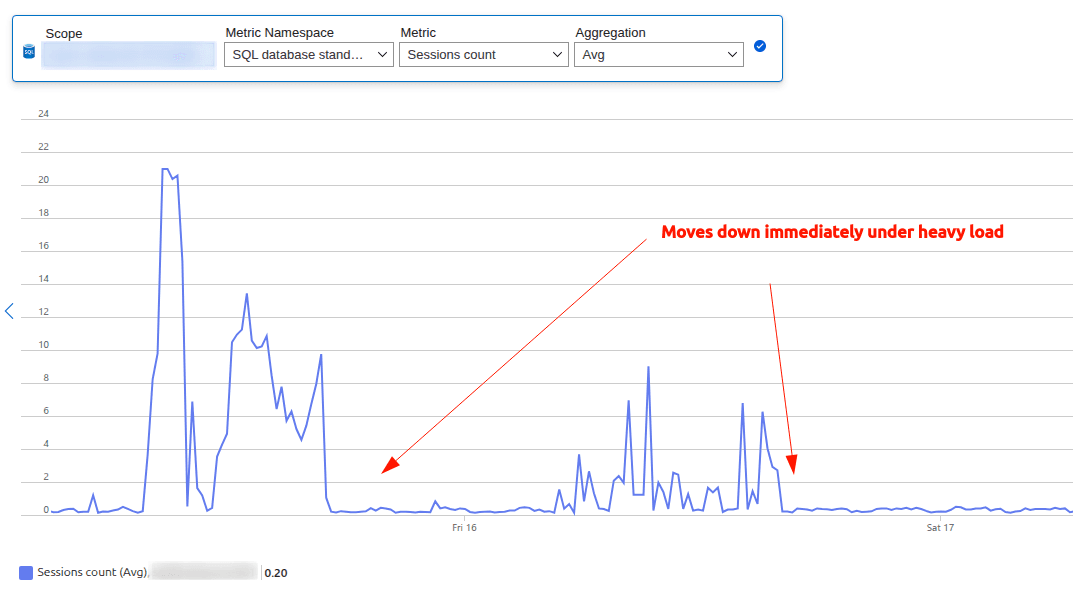
- Monitoring tools like Azure Monitor are invaluable for identifying patterns
Key Takeaways
If you're dealing with connection leaks in serverless environments:
- Don't trust your assumptions - Test each hypothesis systematically
- Look for patterns - Consistent behavior often points to the root cause
- Compare environments - What's different between working and broken systems?
- Check your transactions - Ensure every transaction is properly committed or rolled back
- Embrace the challenge - Complex bugs are opportunities to deepen your understanding
There's something deeply satisfying about solving difficult problems. This bug pushed me to understand our system architecture at a deeper level and gave me confidence to tackle even trickier issues in the future.